Overview
An app runs inside Scompler, adding functionality without requiring users to leave the platform.
Apps let developers:
- Add custom user interface elements and interactive workflows.
- Access platform data securely via API.
- React to platform events using webhooks.
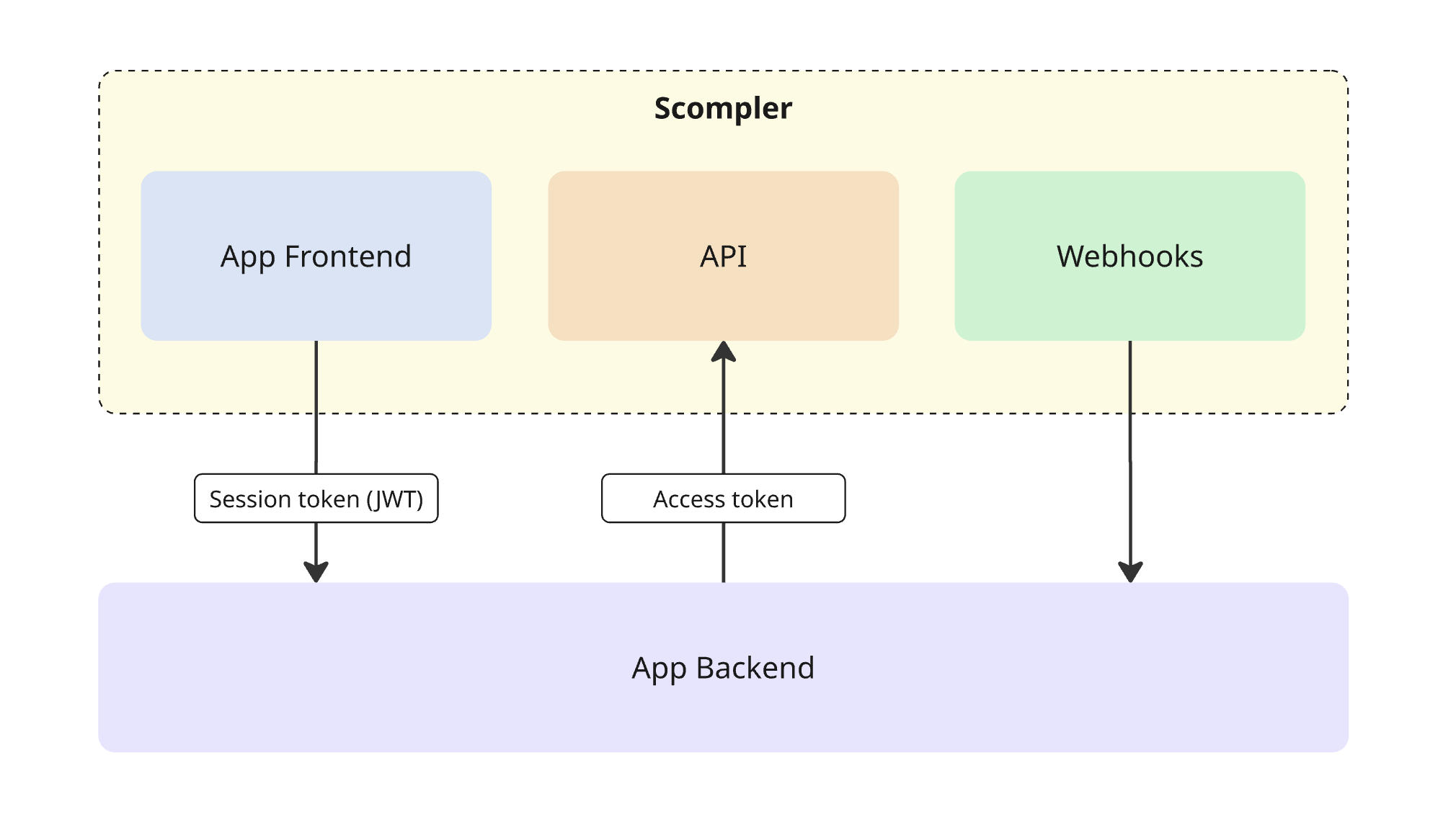
Each app consists of a frontend, which runs in the Scompler interface, and a backend, which manages authentication, API requests, and event handling.
How it works
Key components
App Frontend
The App Frontend is your app's UI, loaded by Scompler inside an iframe. It uses App Bridge to communicate with Scompler.
App Bridge
App Bridge is a JavaScript library you install in your App Frontend. It handles communication between your app and Scompler, including retrieving session tokens for authenticating requests to App Backend.
UI Kit
UI Kit is a React component library that provides pre-built components for building app interfaces in the Scompler style. Use it to ensure your app looks and feels native to the platform without building UI from scratch.
App Backend
The App Backend is your server-side application. It handles business logic, communicates with the Scompler API, and serves data to App Frontend.
Scompler API
The Scompler API is a GraphQL server that gives your App Backend access to platform data.
Webhooks
Webhooks allow your app to react to platform events in real time.
App lifecycle
1. Installation
When a user installs the app, Scompler sends an access_token to the app's callback URL. The app then uses this token to make requests to the Scompler API.
2. App launch
When a user opens the app, Scompler loads the App Frontend inside an iframe. Your app must verify the request is legitimate before rendering.
3. Authenticated requests
The App Frontend uses App Bridge to retrieve a session token (JWT) and includes it in requests to the App Backend. Your backend uses the access_token to call the Scompler API as needed.
4. Webhooks
Scompler sends event notifications to your app when platform events occur (for example, when an app is uninstalled).