Authentication
Authentication ensures that all communication between Scompler and your app is secure and trusted.
Your app must validate requests at different stages of the lifecycle, including installation, runtime interactions and webhooks.
App secret
The app secret is a private credential generated for your app.
It is used to verify that requests and tokens issued by Scompler are authentic and have not been modified.
You can find the app secret in the app configuration.
Keep your app secret secure. Never expose it in frontend code or share it publicly.
Tokens
Scompler issues different types of tokens depending on the stage of the app lifecycle.
Each token serves a specific purpose.
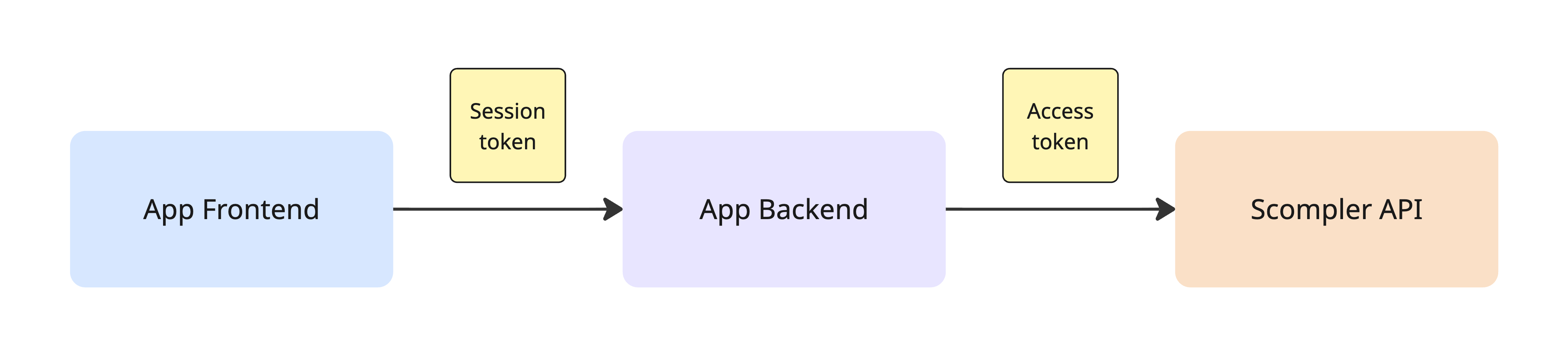
| Session token | Access token | |
|---|---|---|
| Issued by | App Bridge (runtime) | Scompler (on install) |
| Used for | App Frontend → App Backend | App Backend → Scompler API |
| Lifetime | 60 seconds | Long-lived, refreshable |
| Storage | Never stored | Securely on the backend |
Session token
The session token is a JWT (JSON Web Token) issued at runtime via App Bridge. It is used by the frontend to authenticate requests to the App Backend.
The session token:
- Is valid for 1 minute (short-lived). It must be refreshed via App Bridge once expired.
- Is included in App Frontend → App Backend requests.
- Must be validated by the App Backend using the app secret.
- Is not used for calling Scompler API.
Session token payload
| Field | Description |
|---|---|
iss | The domain that issued the token (e.g. pro.scompler.com). |
account_id | The ID of the account associated with the session. |
sub | The ID of the current user in the app. |
aud | The ID of the app. |
iat | Timestamp when the token was created (Unix time). |
exp | Timestamp when the token expires (Unix time). |
Example payload:
{
  "iss": "pro.scompler.com",
  "account_id": 12345,
  "sub": "67890",
  "aud": "e3b0c442-98fc-4f12-9cde-1a2b3c4d5e6f",
  "iat": 1676620800,
  "exp": 1676620860
}
Access token
Issued during app installation and used by App Backend to call Scompler API.
The access token:
- Is stored in the App Backend.
- Is associated with a specific account.
- Must never be exposed to the frontend.
- Is delivered alongside an
expires_attimestamp marking when it stops being accepted. - Can be renewed before it expires via the
refreshPublicAccessTokenmutation, which returns a new token andexpiresAt.
Handle token expiry: Refresh proactively when expires_at is close. An expired token cannot be refreshed (the user must re-install the app to issue a new one).
async function refreshAccessToken(currentToken) {
  const response = await fetch(process.env.API_URL, {
    method: 'POST',
    headers: {
      'Content-Type': 'application/json',
      Authorization: `Bearer ${currentToken}`,
    },
    body: JSON.stringify({
      query: `
        mutation RefreshToken($input: RefreshPublicAccessTokenInput!) {
          refreshPublicAccessToken(input: $input) {
            data { token expiresAt }
            errors { message }
          }
        }
      `,
      variables: { input: { token: currentToken } },
    }),
  })
  const { data } = await response.json()
  return data.refreshPublicAccessToken.data // { token, expiresAt }
}
Persist the new token and expiresAt immediately. The previous token is invalidated as soon as a refresh succeeds, any reuse will return 401.
Authentication flows
Authentication in Scompler occurs at four key stages throughout an app's lifecycle. Understanding each stage is crucial for building a secure application.
| Flow | Method |
|---|---|
| Installation (auth callback) | HMAC SHA256 (X-Signature header) |
| App launch | HMAC SHA256 (query params) |
| Runtime requests (App Frontend → App Backend) | Session token (JWT via App Bridge) |
| App Backend → Scompler API | Access token |
| Webhooks | HMAC SHA256 (X-Signature header) |
Installation
When a user installs or re-authenticates your app, Scompler sends an HTTP POST request to your callback URL containing the access token.
Request headers:
X-Signature: <hmac>
Verify the X-Signature header by computing HMAC SHA256 of the raw request body using your app secret, then compare it to the header value.
const crypto = require('crypto')

function verifyCallbackSignature(rawBody, signature, appSecret) {
  const expected = crypto.createHmac('sha256', appSecret).update(rawBody).digest('hex')
  return crypto.timingSafeEqual(Buffer.from(expected), Buffer.from(signature))
}
// Express.js example
app.post('/callback', express.raw({ type: 'application/json' }), async (req, res) => {
  const signature = req.headers['x-signature']
  if (!verifyCallbackSignature(req.body, signature, process.env.APP_SECRET)) {
    return res.status(401).send('Invalid signature')
  }
  const { account_id, access_token, expires_at } = JSON.parse(req.body)
  // Store the access token securely
  await saveAccessToken({ account_id, access_token, expires_at })
  res.sendStatus(200)
})
Pass the raw request body bytes to the HMAC function - not the parsed JSON object. Parsing may alter whitespace or key ordering.
App launch
When a user opens your app, Scompler loads it in an iframe with signed query parameters. You must verify the hmac parameter before rendering any content.
Query parameters:
| Parameter | Description |
|---|---|
account_id | The account identifier |
host | Base64 URL-safe encoded URL |
timestamp | Unix timestamp of the request |
language | The current language |
hmac | HMAC SHA256 signature of the other parameters |
To verify the hmac:
- Collect all query parameters except
hmac. - Sort them alphabetically by key.
- Serialize as a query string:
key=value&key=value. - Compute HMAC SHA256 using your app secret as the key.
- Compare the result to the
hmacparameter.
const crypto = require('crypto')

function verifyLaunchHmac(query, appSecret) {
  const { hmac, ...rest } = query
  const message = Object.keys(rest)
    .sort()
    .map((key) => `${key}=${rest[key]}`)
    .join('&')
  const expected = crypto.createHmac('sha256', appSecret).update(message).digest('hex')
  return crypto.timingSafeEqual(Buffer.from(expected), Buffer.from(hmac))
}
Always use a timing-safe comparison (e.g. crypto.timingSafeEqual) to prevent timing attacks.
Runtime requests (App Frontend → App Backend)
App Frontend authenticates requests to App Backend using session tokens obtained from App Bridge.
Use App Bridge to make authenticated requests to your backend:
import { createAppBridge } from '@scompler/app-bridge'

const app = createAppBridge({ appId: 'my-app' })

// Recommended: use authFetch - handles token lifecycle automatically
const response = await app.authFetch('/api/data')

// Or get the token directly for custom HTTP clients
const token = await app.getSessionToken()
Verify the token on your backend:
const jwt = require('jsonwebtoken')

function verifySessionToken(token, appSecret, appId) {
  return jwt.verify(token, appSecret, {
    algorithms: ['HS256'],
    audience: appId,
  })
}
Handle token expiry: Session tokens expire after 60 seconds. Rather than pre-emptively refreshing on a timer, the recommended pattern is to retry the request once if the server responds with 401.
Webhooks
Webhook event payloads are signed the same way as the auth callback. Verify the X-Signature header using HMAC SHA256 of the raw body before processing any event.
See Webhooks for details on event types and payload structure.